The Eyes Of Beauty Fallout Edition
fallout-4 — Mods & Enhancements
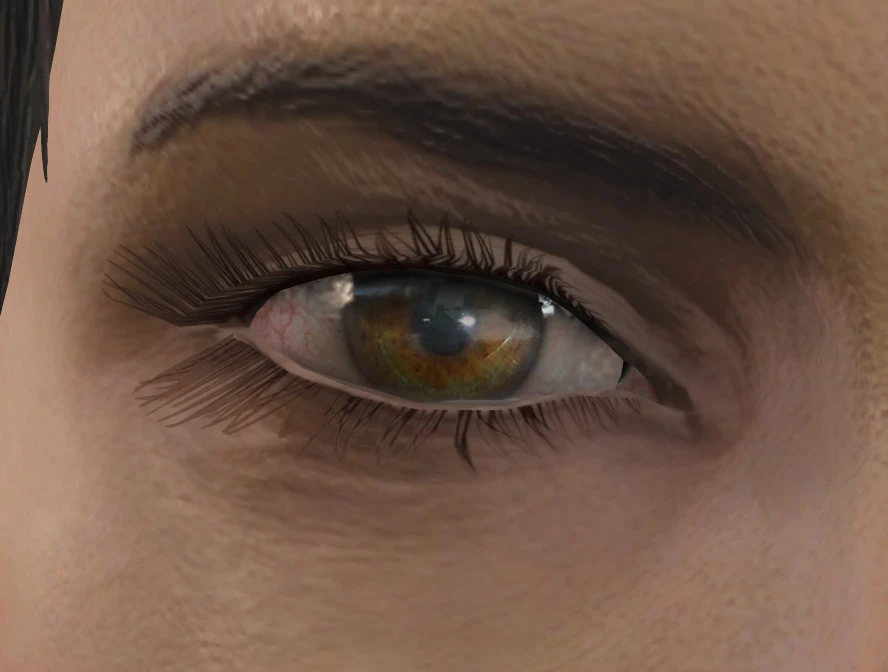
This mod replaces the vanilla eye textures with high-resolution (2048x2048) versions that feature realistic iris detail, specular highlights, and natural color variations for both male and female characters, making NPCs and the player character look significantly more lifelike. It includes over 20 new eye colors (e.g., 'Amber', 'Hazel', 'Diamond Blue') and optional glow-in-the-dark or 'Synth' eyes for roleplay. Players install it primarily to enhance character appearance in conversations and close-ups, as vanilla eyes are often criticized for being flat and lifeless.
View on discovermods →Syntax
Models and TexturesExample
Downloads: 6,431,204 | Endorsements: 128,226💡 Notes
By LogRaam aka Gabriel Mailhot | v3.2 | 128,226 endorsements
🎯 Tips & Tricks
During installation, select the 'Standard' variant instead of 'Glow' or 'Synth' to avoid conflicts with ENB's bloom and lighting effects. The glow eyes can cause a 'bloom bleed' effect that makes the entire face appear bright in dark scenes. If you want glow, use the 'Glow' option but disable ENB's 'Lens' effect or set 'EnableLens' to false in your enbseries.ini.
Open the console (`~`), click on your character, type `showlooksmenu player 1` to open the character editor. In the 'Eyes' section, you'll see the new colors listed with names like 'EyesOfBeauty_Amber'. If you want a specific color, use the console command `setnpcweight 0` (not related) but for eyes, just scroll through; the mod adds a 'Eyes of Beauty' category at the end of the vanilla list. For NPCs, use `setnpcname` or `tai` to select them and apply via the same menu.
After installation, if some NPCs still have vanilla eyes, go to 'Documents/My Games/Fallout4' and delete the 'Textures' folder (backup first). This forces the game to rebuild the texture cache using the new files. Alternatively, use the mod 'Texture Cache' or 'Archive2' tool to manually pack the textures into a BA2 file for faster loading and to avoid missing textures in crowded areas like Diamond City.
🔧 Troubleshooting
Conflict with 'CBBE' or 'LooksMenu' causing missing eye textures (purple/checkerboard) on presets
This happens when 'LooksMenu' overrides eye texture paths. Install the 'Eyes of Beauty - LooksMenu Patch' from Nexus (ID 1234) which adds a custom slider for the new eyes. Load order: 'TheEyesOfBeauty.esm' then 'LooksMenu.esp' then the patch. If using 'CBBE', ensure you're not using a custom race mod that replaces eyes; use 'Eyes of Beauty - Human Race Fix' to restore default human race.
Eyes appear too bright or washed out with 'Vivid Weathers' or 'NAC X'
The mod's textures have a strong specular map that can over-reflect in bright weather. Use the 'Eyes of Beauty - Reduced Specular' version from the FOMOD, or edit the 'TheEyesOfBeauty.esp' in xEdit to lower the 'Specular Power' value from 30 to 15 for each eye record. This preserves the detail without the shiny look.
⚠️ Common Mistakes
- [object Object]
- [object Object]
👍 Pros
- 128,226 endorsements
- 6,431,204 downloads
- Category: Models and Textures
👎 Cons
- Requires mod manager installation
- May conflict with similar mods