Spring Cleaning
fallout-4 — Mods & Enhancements
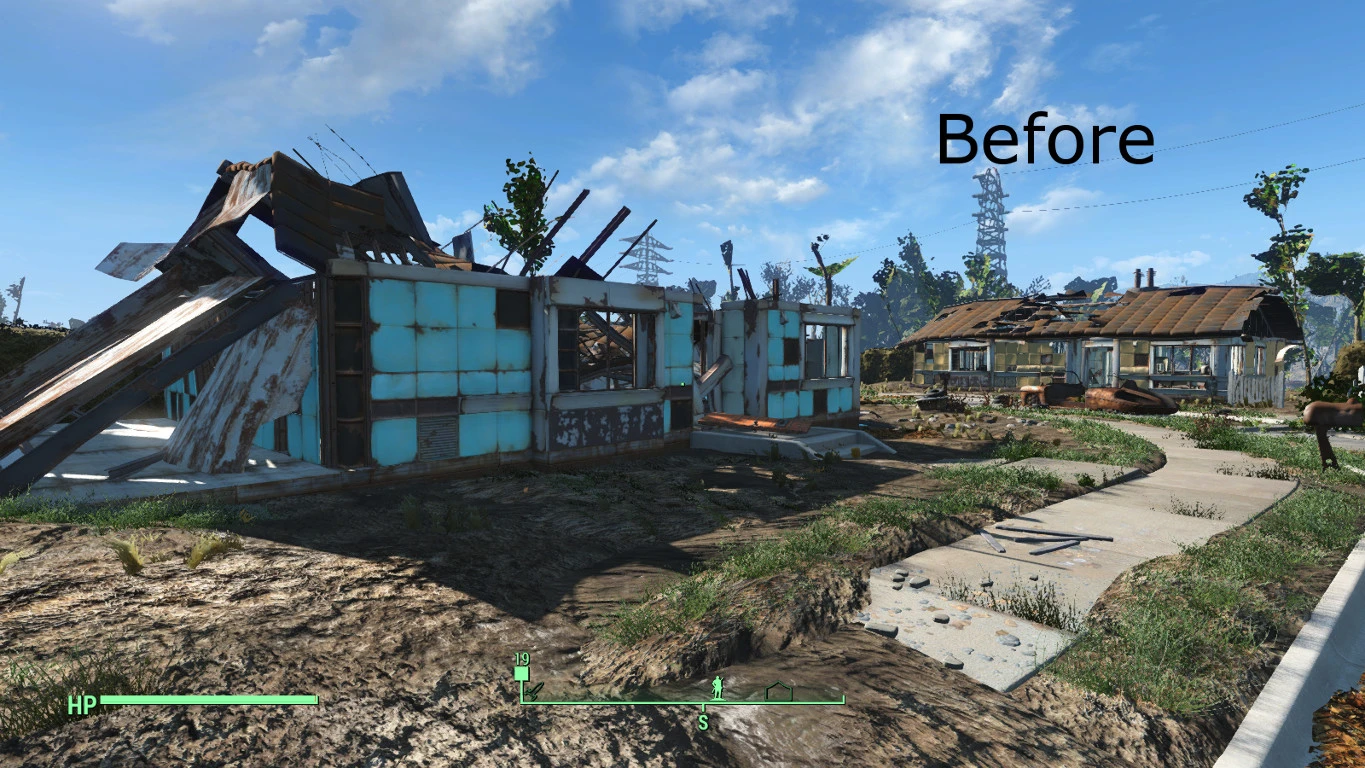
Spring Cleaning removes the pre-combined junk objects (rubble, leaves, skeletons, broken furniture) from settlement cells that vanilla Fallout 4 leaves as static, un-scrappable debris. It works by editing the PreVis/PreCombined data for each settlement, allowing you to scrap these items via the workshop menu, which frees up build budget and lets you create truly flat, clean foundations for large builds. Players install it to eliminate visual clutter, improve FPS by removing thousands of hidden polys, and to reclaim buildable space that vanilla forces you to work around.
View on discovermods →Syntax
Player SettlementExample
Downloads: 2,227,629 | Endorsements: 81,183💡 Notes
By Nverjos | v2.05 | 81,183 endorsements
🎯 Tips & Tricks
After installing Spring Cleaning, load your save, open the workshop in any settlement (e.g., Sanctuary), and use the 'Scrap' menu to target debris like the broken house frames or leaf piles. To avoid massive FPS drops from broken precombines, run the 'Spring Cleaning Previsibines Repair Pack' from the Nexus, which regenerates PreVis for all affected cells. In Fallout4.ini under [General], set bUseCombinedObjects=0 only if you accept a 20-30 FPS hit—otherwise keep it at 1 and use the repair pack.
Some objects (e.g., the giant rock in Starlight Drive-In) are not scrappable even with Spring Cleaning. Use the console command 'setownership' on the object, then 'disable' to remove it permanently—but beware, this can break navmeshes for settlers. Better: use the 'Scrap Everything' mod's 'Scrap That Settlement' addon, which includes a hotkey (default: R) to force-scrap any highlighted object, but only after Spring Cleaning has unlocked the cell.
When you scrap large debris, the game still counts the original precombined object in memory. To force a hard reset and reclaim full budget, open console, type 'scrapall' (removes all vanilla-scrappables), then 'markfordelete' on any remaining flagged items. For a permanent fix, install 'Settlement Menu Manager' and use its 'Reset Workshop' feature, which rebuilds the workshop array without touching your placed items.
🔧 Troubleshooting
CTD when entering settlements like Red Rocket or Abernathy Farm after installing Spring Cleaning
This is caused by a conflict with 'Sim Settlements 2' which also edits precombines. Download the 'Spring Cleaning - Sim Settlements 2 Patch' from the SS2 forums. Load order: place Spring Cleaning's ESP ABOVE Sim Settlements 2, and ensure the patch is loaded last. Also, delete any 'PreVis' files from your Data folder if you previously used 'Previsibines Repair Pack' with an older version.
Invisible walls or floating debris after scrapping in Sanctuary
This happens when 'Scrap Everything' is installed alongside Spring Cleaning, as both fight over the same precombined objects. Uninstall Scrap Everything entirely, then run the 'Fallout 4 Precombine Cleaner' tool from Nexus to rebuild the PreVis for Sanctuary. In your Fallout4Custom.ini, add [General] bUseCombinedObjects=1 and [Papyrus] bEnableLogging=0 to prevent script lag from broken references.
⚠️ Common Mistakes
- [object Object]
- [object Object]
👍 Pros
- 81,183 endorsements
- 2,227,629 downloads
- Category: Player Settlement
👎 Cons
- Requires mod manager installation
- May conflict with similar mods